Smart Themes Editor is a theme editing tool provided by Cafe24 for free.
Please see instructions below on how to use it.
Settings
1. Go to [Themes (Mobile)>My themes>Saved themes] and click [Edit] on the right side of the theme you want to edit to open Smart Themes Editor.
You can also open Smart Themes Editor by clicking the [Edit store themes] on the main page of [Themes (Mobile)] and edit the theme in use.
2. Select the page to edit on the left on Smart Themes Editor.
You can search for pages you want to edit by URL path in [All pages (tab)].

Smart Themes Editor is a theme editing tool provided by Cafe24 for free.
Please see instructions below on how to use it.
Settings
1. Go to [Themes (Mobile)>My themes>Saved themes] and click [Edit] on the right side of the theme you want to edit to open Smart Themes Editor.
You can also open Smart Themes Editor by clicking the [Edit store themes] on the main page of [Themes (Mobile)] and edit the theme in use.
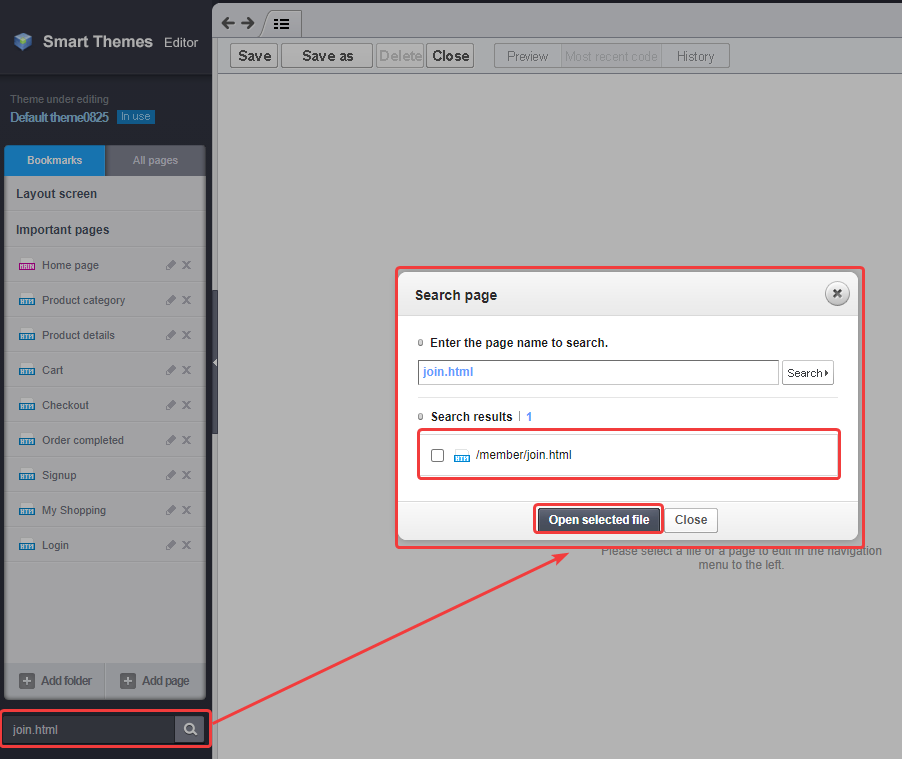
2. Select the page to edit on the left on Smart Themes Editor.
You can search for pages you want to edit by URL path in [All pages (tab)].