You can set up SSO in [My store>Store setup>Single Sign-On].
What is SSO?
Single Sign-On, or SSO, is an authentication scheme that allows a user to access multiple services by logging in with a single ID and password.
You need to set up SSO to permit users to log in to a Cafe24 online store by using third-party credentials.
*If you want to set up SSO with social media credentials, go to [Promotions>Social media>Social login] on the admin page.
How to set up
1. Go to [My Store>Store setup>Single Sign-On]
2. Click [Add SSO service] and enable SSO.
3. Follow the SSO guidelines to fill in all required fields and save.
SSO Guidelines
1. SSO process
*This feature has been created based on the OAuth 2.0 method.
2. What to enter
The values required for SSO setup are:
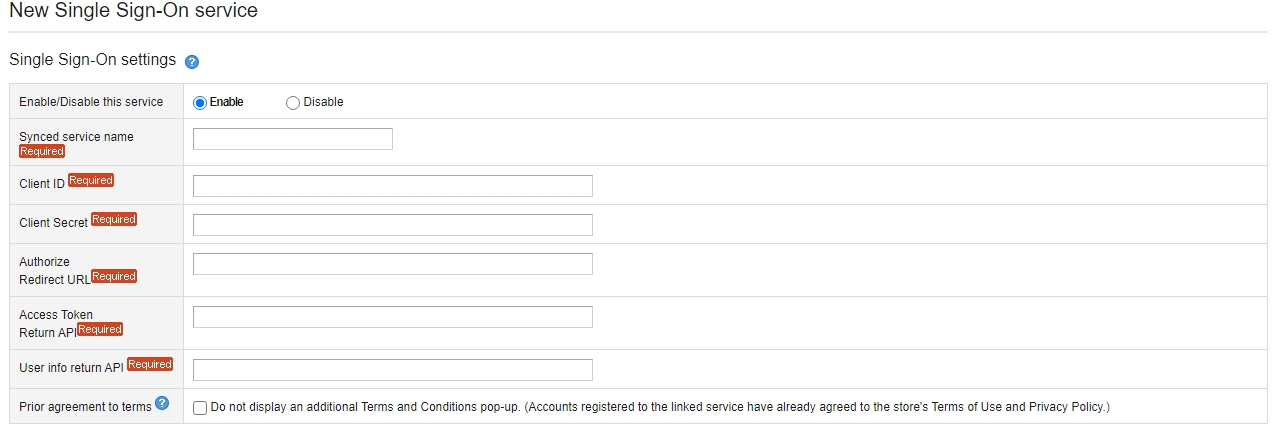
1) Service name
Enter the name of an identity provider (IdP).
E.g. Facebook
2) Client ID/Client Secret
Enter a client ID and client secret from the IdP.
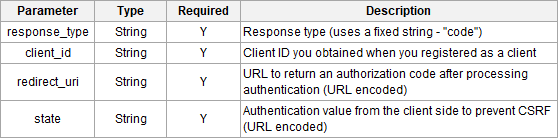
3) Authorize Redirect URL (login request URL)
This value is required in step 2 of the process.
Enter the URL of the IdP’s OAuth login page.
[HTTP Method]
GET
[Request]
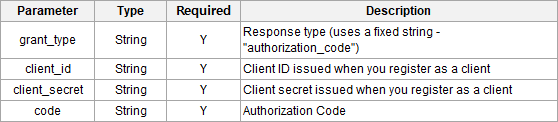
4) Access Token Return API (URL to get an access token)
Enter the URL to get an access token needed in step 6 of the process.
[HTTP Method]
POST
[Request]
[Request(JASON)]

5) User info return API (URL to get user information)
Enter the URL to get user information needed in step 8 of the process.
[HTTP Method]
POST
[Request]

[Request(JASON)]

6) Prior agreement to terms
Check the box for [Prior agreement to terms] to hide the additional pop-up for customers who log in with a relevant SSO account.
You can set up SSO in [My store>Store setup>Single Sign-On].
What is SSO?
Single Sign-On, or SSO, is an authentication scheme that allows a user to access multiple services by logging in with a single ID and password.
You need to set up SSO to permit users to log in to a Cafe24 online store by using third-party credentials.
*If you want to set up SSO with social media credentials, go to [Promotions>Social media>Social login] on the admin page.
How to set up
1. Go to [My Store>Store setup>Single Sign-On]
2. Click [Add SSO service] and enable SSO.
3. Follow the SSO guidelines to fill in all required fields and save.
SSO Guidelines
1. SSO process
*This feature has been created based on the OAuth 2.0 method.
2. What to enter

The values required for SSO setup are:
1) Service name
Enter the name of an identity provider (IdP).
E.g. Facebook
2) Client ID/Client Secret
Enter a client ID and client secret from the IdP.
3) Authorize Redirect URL (login request URL)
This value is required in step 2 of the process.
Enter the URL of the IdP’s OAuth login page.
[HTTP Method]
GET
[Request]

4) Access Token Return API (URL to get an access token)
Enter the URL to get an access token needed in step 6 of the process.
[HTTP Method]
POST
[Request]

[Request(JASON)]

5) User info return API (URL to get user information)
Enter the URL to get user information needed in step 8 of the process.
[HTTP Method]
POST
[Request]

[Request(JASON)]

6) Prior agreement to terms
Check the box for [Prior agreement to terms] to hide the additional pop-up for customers who log in with a relevant SSO account.