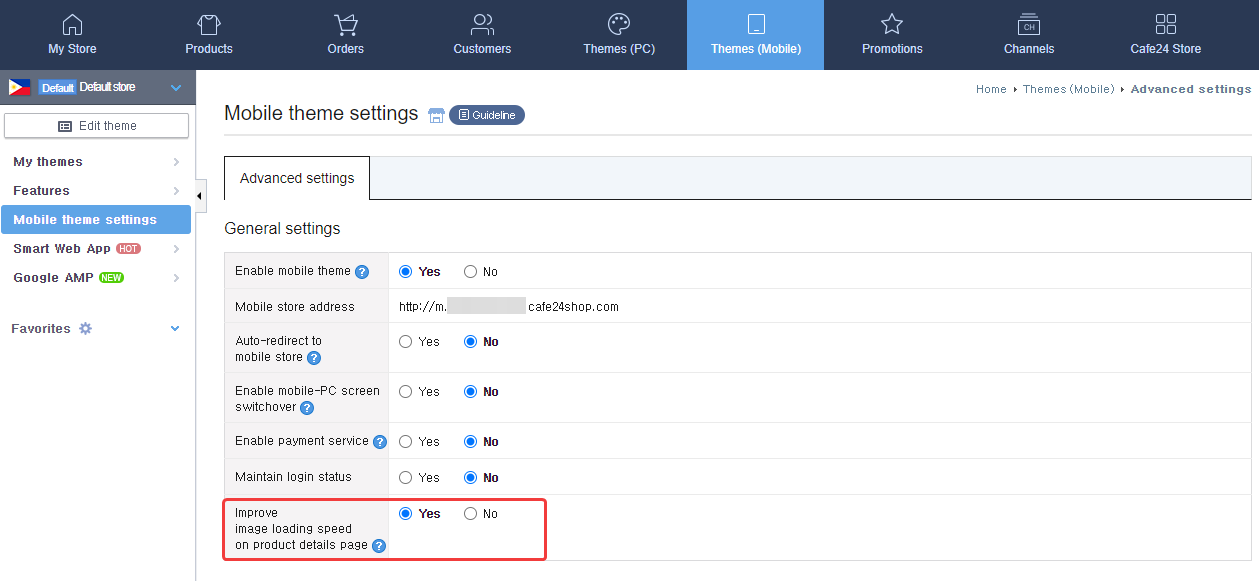
If you have enabled faster loading for images, larger images will appear as gray boxes when loading.
If you have chosen [Yes] for [Improve image loading speed on product details page] in [Themes (Mobile)>Mobile theme settings], larger images will appear as gray boxes.
When enabled, images will not load all at once and will only begin to load as you scroll down the page, thereby reducing the image load time at the very beginning. Images will therefore appear as gray boxes when loading. Depending on the file size of the images, store visitors can end up using more mobile data than normal. It is therefore recommended that you reduce them to suitable size for mobile devices.
• These settings can only be accessed through Advanced Mode. If you are using Smart Mode, switch to Advanced Mode to access the necessary settings.